Cleaning a Mac with Claude Code or Codex: what it finds, and what it must not delete
AI coding agents can find and clear developer caches on a Mac. What they found on ours, a safe prompt, and the folders never to let them touch.
You can use Claude Code to clean your Mac Running out of disk space. Opened Claude Code and asked it to find and clean temporary files. One prompt... Done What it cleaned: - NPM cache: 5.5GB - Homebrew old packages: 456MB - Yarn cache: 2.3GB Recovered 7.3GB total.
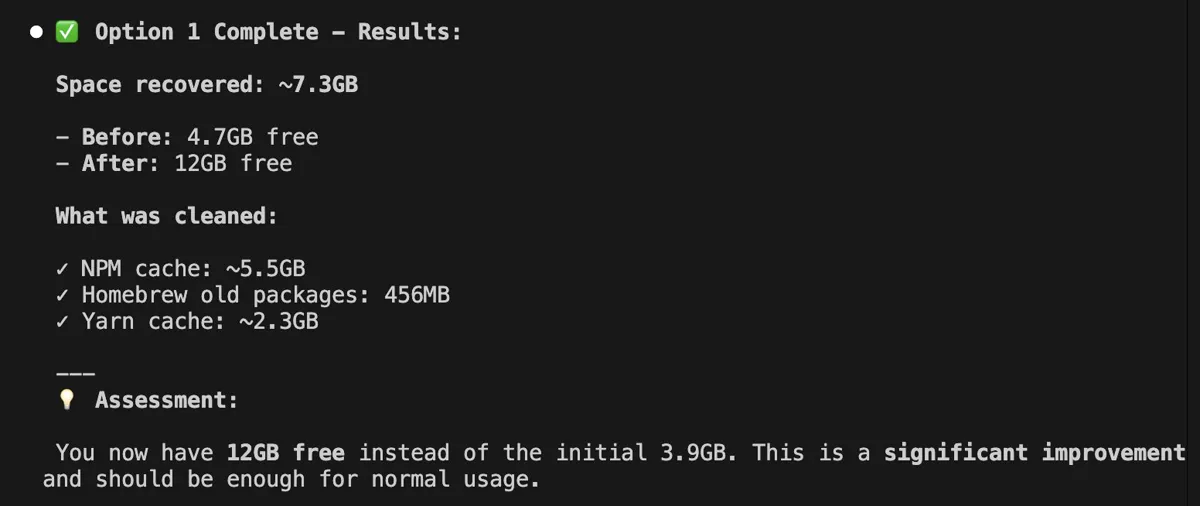
Can Claude Code clean your Mac?
Yes, for the caches developer tools leave behind. It can measure folders, explain what each one is, and run the tool's own clean command. On our Mac the package caches it would find came to about 9 GB:
| Cache | Where | On our Mac |
|---|---|---|
| npm | ~/.npm | 6.4 GB |
| pnpm store | ~/Library/pnpm/store | 1.5 GB |
| Yarn | ~/Library/Caches/Yarn | 1.0 GB |
| Homebrew downloads | ~/Library/Caches/Homebrew | 292 MB |
| pip | ~/Library/Caches/pip | 48 MB |
du -sh ~/.npm ~/Library/pnpm/store ~/Library/Caches/Yarn ~/Library/Caches/Homebrew ~/Library/Caches/pip 2>/dev/nullIs it safe to let an AI agent delete files on a Mac?
It is safe when the agent lists first and you approve each delete. Ask it to use each tool's own command rather than removing folders by hand: npm cache clean --force, pnpm store prune, yarn cache clean and brew cleanup all know what can go.
What should an AI agent never delete?
~/Library/Containersand~/Library/Group Containers: the data of sandboxed apps, including local notes, settings and libraries. 4.5 GB on our Mac, none of it cache.- Anything under
/Systemor/Libraryit cannot explain. ~/Library/Application Supportfolders of apps you still use.- Photos, Mail and Messages libraries, which hold originals.
A prompt that keeps it safe
List the 20 largest folders in my home folder and in ~/Library, with sizes.
Do not delete anything yet.
For each one, say what it is, whether it rebuilds itself, and the official
command that clears it. Never include ~/Library/Containers or /System.
Read the list, then approve deletes one line at a time. The same list as a map, with what each folder is, is what the developer cleanup script and npm cache guide cover by hand.
What can it not see?
Folders macOS protects. Without Full Disk Access, Terminal cannot read Mail, Messages and several Library folders, so the agent reports them as empty. The largest System Data items often sit there or in local snapshots: what System Data holds.
Common questions
Can Claude Code or Codex free up disk space on a Mac?
Yes, mostly by clearing developer caches such as npm, pnpm, Yarn and Homebrew downloads. On our MacBook Air those came to about 9 GB in October 2026. Ask it to list and explain first, then approve each delete.
Is it safe to let AI delete files on my Mac?
Only with review. Ask for a list with sizes and the official clean command for each item, never a blanket delete. Keep it away from ~/Library/Containers, /System and app libraries, which hold data rather than cache.
Why does Claude Code not see some large folders?
macOS blocks Terminal from Mail, Messages and other protected folders unless it has Full Disk Access, so they look empty to the agent. Local snapshots also do not show up as folders.