Yarn Berry and pnpm keep a global store, and it is not the cache
Both package managers keep a shared store outside your projects. What is in it, what pruning removes, and why deleting it can break existing projects.
Claude Code removed 40+ GB of storage from my Mac! I consistently reached the full storage limit in my 512 Gb of storage Mac Studio. I'm using Docker, PNPM, Bun ... Claude helped me clean 40+ GB of unused storage by removing duplicate store npm libraries, pnpm and bun cache.
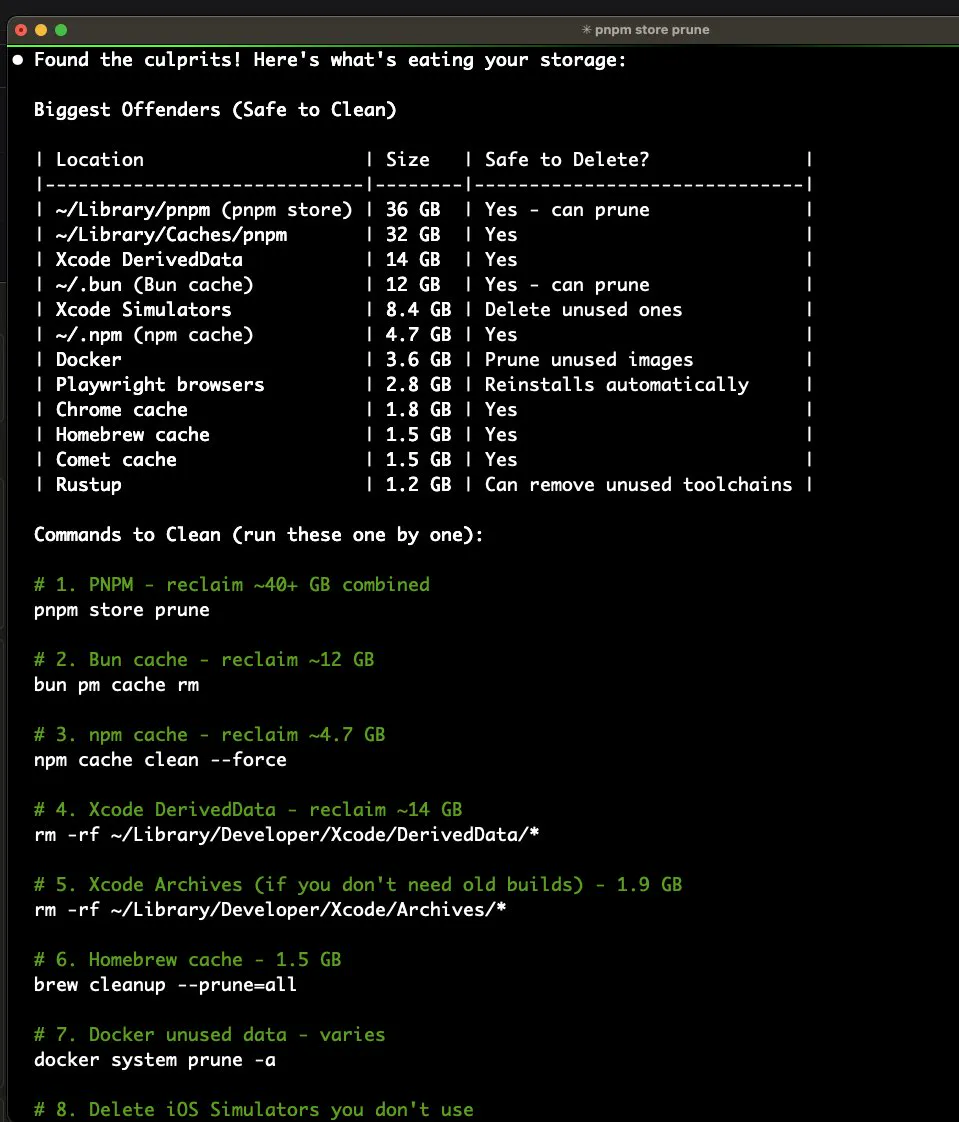
Both Yarn Berry and pnpm solved the same problem in the same way: keep one copy of every package version in a shared place, and link projects to it rather than copying. It works, and it moves the disk cost from your projects into a folder you never open.
Where each one keeps its store
| Tool | Location | Command to inspect |
|---|---|---|
| Yarn Berry | ~/.yarn/berry/cache | yarn cache list |
| Yarn Classic | ~/Library/Caches/Yarn | yarn cache dir |
| pnpm | ~/Library/pnpm/store | pnpm store path |
| npm | ~/.npm/_cacache | npm cache verify |
du -sh ~/.yarn ~/Library/Caches/Yarn "$(pnpm store path 2>/dev/null)" \
  ~/.npm 2>/dev/null | sort -h
The difference that matters before you delete anything
An npm cache is a cache: delete it and npm redownloads. A pnpm store is not only a cache. Projects installed with pnpm contain hard links into the store, so removing the store can leave existing node_modules folders pointing at files that are gone, and those projects need a reinstall rather than simply being slower.
Yarn Berry sits in between. With the default settings the cache holds the zip archives your projects resolve against, and depending on how a project is configured, removing it can mean a reinstall rather than a redownload.
The safe way to shrink each one
pnpm store prune          # removes packages no project references
yarn cache clean          # Berry, inside a project
yarn cache clean --mirror # also clears the shared mirror
pnpm store prune is the one worth running regularly. It removes only versions that nothing on the machine links to, which is exactly the accumulation you want gone and none of the links you still need.
The bigger number is still in your projects
Whatever the store costs, the copies inside projects usually cost more, particularly if some projects use npm and get their own full node_modules. Find them all with the command in node_modules across every project, and check the npm cache while you are there, since a machine that has used several package managers is keeping several stores at once.
Done with them altogether? See uninstalling pnpm and uninstalling Yarn, including the copies each Node version keeps.
Common questions
Where is the yarn cache on a Mac?
Yarn Berry keeps it in ~/.yarn/berry/cache, and Yarn Classic in ~/Library/Caches/Yarn. On a Mac measured in September 2026, ~/.yarn was 767 MB. Running yarn cache dir prints the path your installed version uses.
Is it safe to delete the pnpm store?
Less safe than deleting a cache. Projects installed with pnpm hard link into the store, so removing it can leave existing node_modules folders broken until you reinstall. Run pnpm store prune instead, which removes only what nothing references.
What is the difference between a package cache and a store?
A cache is a copy kept to avoid a download, and deleting it costs only time. A store is shared content that installed projects link to, so deleting it affects those projects directly. npm keeps a cache, pnpm keeps a store, and Yarn Berry sits in between depending on configuration.
How do I shrink the yarn cache safely?
Run yarn cache clean inside a project, and add --mirror if you also want the shared mirror cleared. Check first whether your projects rely on the cache for offline installs, because with some configurations a clean means a reinstall rather than a redownload.