Your .gradle folder keeps a copy of Gradle for every project
The wrapper downloads a full Gradle distribution per version, the caches hold every dependency, and daemon logs pile up. What each part costs.
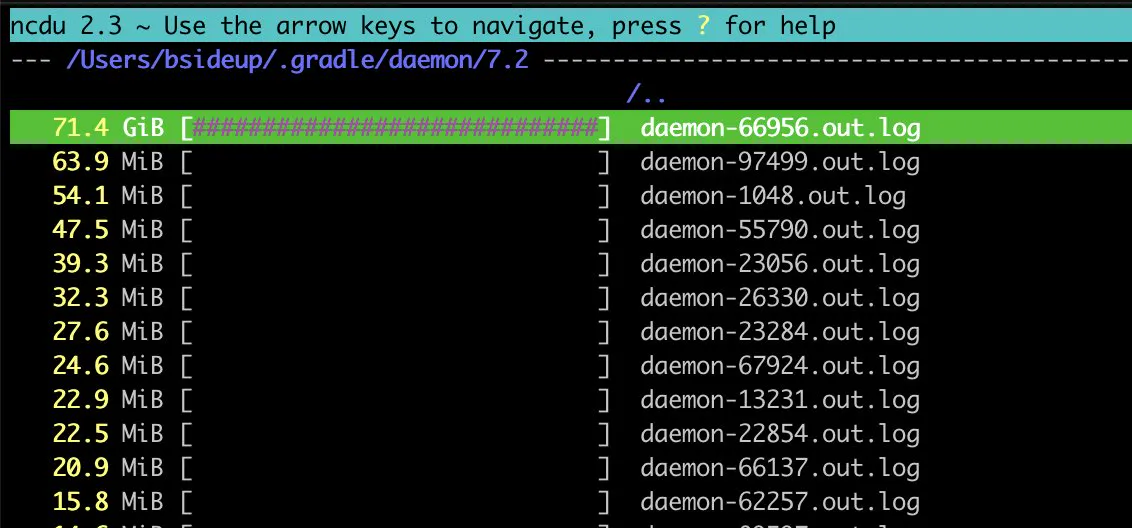
Where did my disk space go?! Oh... Gradle this is a little bit out of control 😅
The Gradle wrapper is a good idea with a storage cost nobody mentions: each project pins the exact Gradle version it wants, and your Mac downloads and keeps a complete copy of every version any project has ever asked for.
What each folder is
| Folder | Holds | Safe to remove |
|---|---|---|
caches/modules-2 | Downloaded dependencies | Yes, redownloaded on next build |
wrapper/dists | A full Gradle distribution per version | Yes, redownloaded when a project asks |
daemon | Logs from background build processes | Yes, and it grows forever |
caches/build-cache-1 | Cached build outputs | Yes, next build is slower |
native | Small platform helpers | Leave it |
du -sh ~/.gradle/* 2>/dev/null | sort -h
du -sh ~/.gradle/wrapper/dists/* 2>/dev/null | sort -h | tail
The wrapper distributions are the easy win
Each entry under wrapper/dists is a complete Gradle, roughly 100 to 200 MB unpacked. You need the versions your current projects pin, which is one line per project:
grep -rh distributionUrl ~/**/gradle/wrapper/gradle-wrapper.properties 2>/dev/null \
  | sort -u
Anything under dists that is not in that output belongs to a project you no longer have, or to a version you have since upgraded past. Removing it costs a download only if something asks for it again.
The daemon folder that only ever grows
Gradle keeps a background process between builds for speed, and it writes a log per daemon per version. Nothing rotates them. On the measured Mac this was 65 MB, which is not a crisis, but it is pure debris and it is safe to clear whenever no build is running.
./gradlew --stop        # from a project, stops running daemons
rm -rf ~/.gradle/daemon # then clear the logs
Doing it without breaking a build
- Stop the daemons first, or the folder is rewritten while you look at it.
- Clear
daemonfreely. It is logs. - Clear
wrapper/distsfor versions no project pins. - Clear
caches/modules-2last. It is the largest and the most annoying to rebuild, since it means redownloading every dependency.
Gradle is rarely alone on a Mac that has it. Android Studio's own folders cover the emulator images and SDK, which are usually larger again, and the Xcode side has the same shape if you build for both platforms.
Removing Gradle itself, and Android Studio's share of this folder: uninstall Gradle and uninstall Android Studio.
Common questions
What is in the .gradle folder on a Mac?
Downloaded dependencies under caches, a complete Gradle distribution per version under wrapper/dists, build caches, and daemon logs. On a Mac measured in September 2026 with only a couple of projects, the total was 992 MB.
Is it safe to delete the Gradle caches folder?
Yes. Everything in it is redownloaded or rebuilt by the next build. The cost is a slow first build and the bandwidth to fetch dependencies again, which is why it is worth clearing last rather than first.
Why does .gradle/wrapper/dists have several Gradle versions?
Because each project pins its own Gradle version through the wrapper, and every version any project has asked for is downloaded and kept. Upgrading a project's Gradle adds a new distribution rather than replacing the old one.
Can I delete the gradle daemon folder?
Yes, once no build is running. Stop daemons with ./gradlew --stop first. The folder holds logs from background build processes, nothing rotates them, and it only grows.