Mac fan loud and hot? How to find what is using the CPU
How to find the process behind a loud fan and a hot Mac: Activity Monitor's CPU tab, what kernel_task and WindowServer mean, and when to quit an app.
Has anyone else seen high CPU/GPU usage in Framer lately? My MacBook sounds like it’s about to take off, the fan is constantly spinning. I’m also noticing duplicates of helpers/renderers in the Activity Monitor.
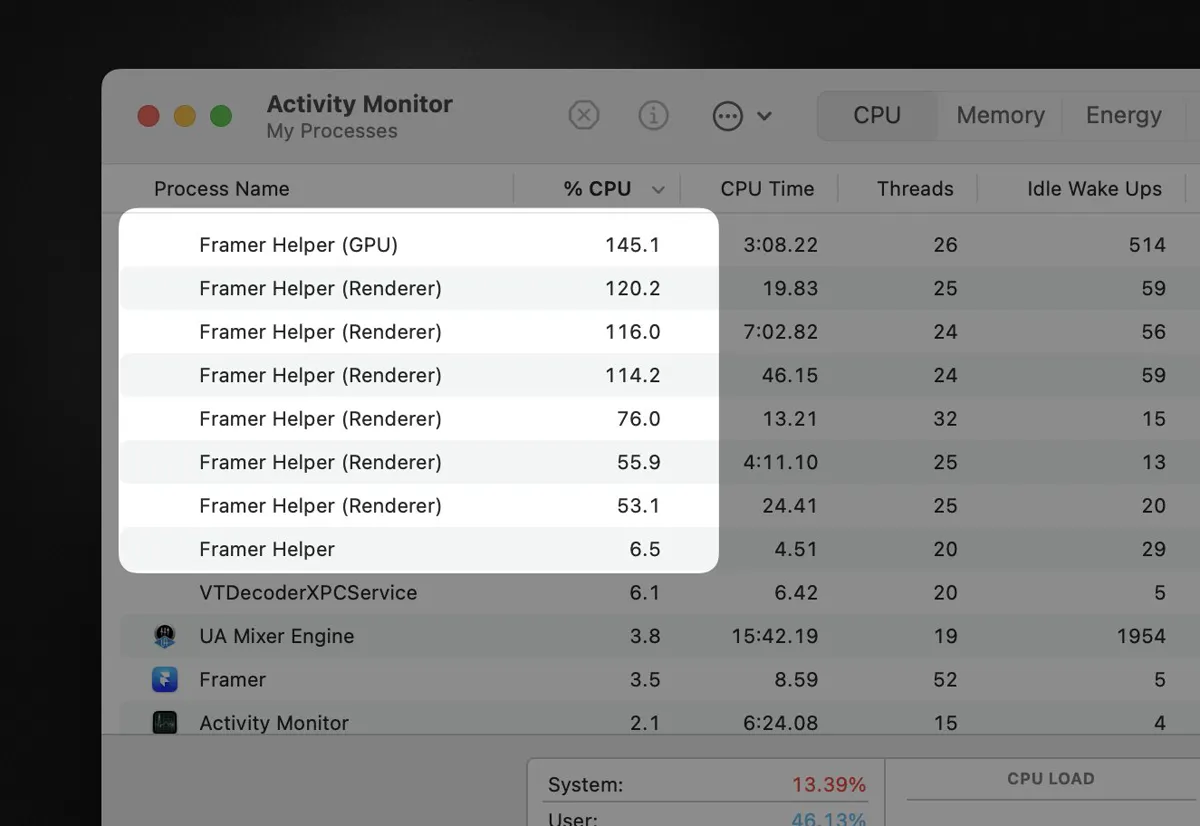
How do I see what is using the CPU on a Mac?
Open Activity Monitor, choose the CPU tab and sort by % CPU. Above 100% means a process is using more than one core. Several helpers of the same app near the top, as in the screenshot, point at that app.
top -l 2 -n 6 -o cpu -stats command,cpu,mem | tail -7Why is kernel_task using so much CPU?
Because the Mac is warm. macOS uses kernel_task to keep the processor less available to apps while it cools down, so a high figure is a symptom of heat. On our MacBook Air it read 63% while ANECompilerService and WindowServer were busy.
What is WindowServer on a Mac?
It draws everything on screen. It rises with external displays, many open windows and animated web pages, and falls when those close.
When memory rather than processor is the problem, see memory pressure on a Mac.
Common questions
How do I find what is making my Mac fan loud?
Activity Monitor, CPU tab, sorted by % CPU. The process at the top using 100% or more is the cause; quit it or update the app.
Is high kernel_task CPU bad?
It is a sign of heat, not a fault. macOS raises kernel_task to keep the processor from overheating. Find the app that is heating the Mac and it drops.