What is draining my MacBook battery? How to find the app
How to find what drains a MacBook battery: the Battery chart, Activity Monitor's Energy tab, and the usual causes like external displays and a busy browser.
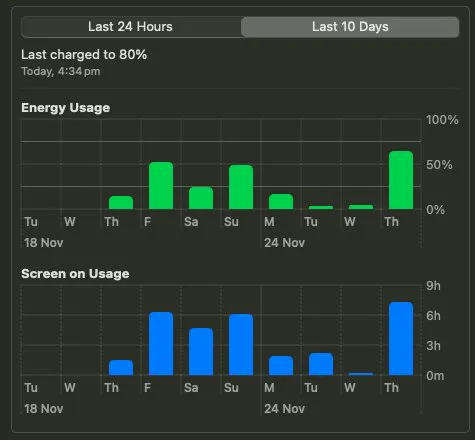
Is this good battery life for the 13" M4 MacBook Air? On Thursday I was using the speakers much more, and was also hooked up to an external monitor which probably contributed to extra battery drain.
What is draining my MacBook battery?
Open Activity Monitor and choose the Energy tab. Sort by Energy Impact: the top rows are what is using power now, and the 12 hr Power column shows what used the most today.
What uses the most battery on a MacBook?
- A browser with many tabs, especially video and web apps.
- External displays and speakers at high volume.
- Background work you did not start: indexing, photo analysis, model compiling after an update.
- Screen brightness, the largest steady drain on any laptop.
On our MacBook Air the busiest processes at one moment were kernel_task (63% CPU), ANECompilerService (49%) and WindowServer (48%): macOS compiling models for the Neural Engine and drawing the screen, not an app we had opened.
How do I see battery usage by day?
System Settings, Battery shows the last 24 hours and the last 10 days of battery level and screen on time. A steep drop on one day points to what you ran that day.
Battery life also shrinks as the battery ages: check battery health and cycle count.
Common questions
How do I see which app drains my MacBook battery?
Activity Monitor, Energy tab, sorted by Energy Impact. The 12 hr Power column shows which apps used the most power over the day.
Why is my MacBook battery draining after an update?
macOS reindexes files and compiles models in the background after an update. On our Mac ANECompilerService used 49 percent CPU at one point. It settles within a day or two.