Memory pressure on a Mac: when swap is fine and when it is not
What the memory pressure graph in Activity Monitor means, how much swap is normal, and how to find the app using it. Measured on an 8 GB Mac using 4.3 GB of swap.
16GB MacBook Pro using 45GB RAM with SWAP memory, I think it's time to upgrade
What is memory pressure on a Mac?
It is how hard macOS is working to find memory for apps. The graph at the bottom of Activity Monitor's Memory tab is green when memory is easy to find, yellow when macOS is compressing and swapping, and red when apps are waiting.
How much swap is normal on a Mac?
A few gigabytes is normal, especially on 8 or 16 GB Macs. Swap only hurts when it keeps growing and the graph turns red. Check it with:
sysctl vm.swapusage
memory_pressure | tail -1How do I find what is using memory?
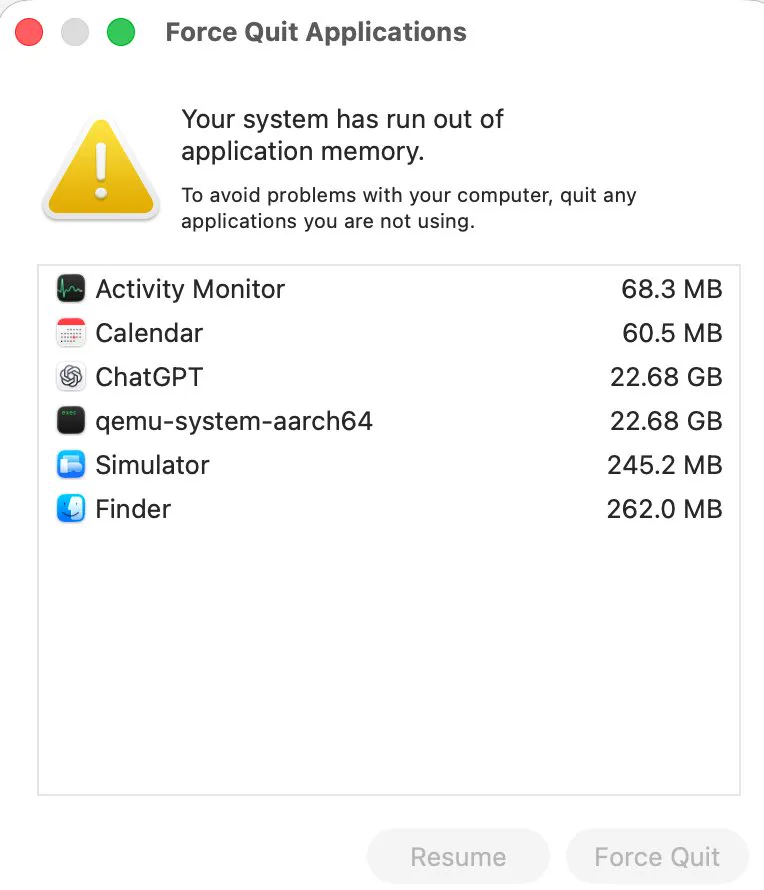
Activity Monitor, Memory tab, sort by Memory. A virtual machine or a long running web app at 20 GB or more, like the two in the screenshot, is usually the whole story.
Does swap use disk space?
Yes. Swap files live on the startup drive, so a nearly full drive leaves less room for them. Swap and sleepimage shows where they are and how large they get.
Common questions
Is it bad if my Mac is using swap?
Not by itself. A few gigabytes of swap is normal; our 8 GB MacBook Air used 4.28 GB in October 2026. It matters when memory pressure turns red and swap keeps growing.
How do I check swap on a Mac?
Run sysctl vm.swapusage in Terminal, or look at Swap Used at the bottom of Activity Monitor's Memory tab.