Why a brand new Mac already shows 40 GB or more in use
macOS, recovery data, bundled apps and asset packs occupy space before you do anything. What each part is and what you can change.
I'm an Apple fan boy - all Apple everything (iPhone/iPod/MacBook/1,272 pairs of AirPod Pros) but legit how do they get away with this? ~140 GB of my 245GB laptop is completely taken up by System Data + MacOS? Is there a way around this?
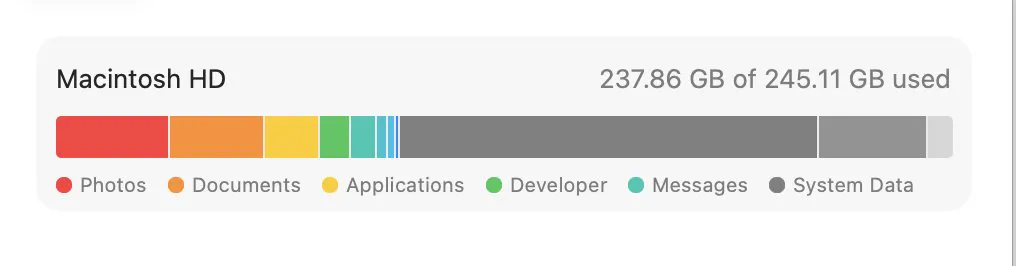
Set up a new Mac, open the storage screen, and a substantial share of the drive is already used before you have copied a single file. Nothing is wrong. Modern macOS is large, and several parts of it are not obvious.
What the space is
| Component | Roughly | Can you change it? |
|---|---|---|
| macOS itself | 15 to 25 GB | No |
| Recovery and Preboot volumes | 1 to 2 GB | No |
| Bundled applications | A few GB | Some can be removed |
| Downloadable asset packs | Varies, can be many GB | Partly, by removing languages |
| Snapshots after setup | Several GB | They thin automatically |
| Swap and sleep image | Equal to memory, eventually | Only by changing hibernation |
The parts people find surprising
The sleep image is sized to your memory, so a 32 GB machine dedicates 32 GB to it once it has slept, as explained in the sleepimage and swap guide. Asset packs for languages, Siri and dictation are next, covered in Apple's downloadable assets, and on a developer Mac they dwarf everything else.
What you can actually reclaim
- Remove languages you do not use, which takes their dictionaries and Siri data with them.
- Remove bundled applications you will never open, though most are small.
- Leave snapshots alone. They thin themselves as the disk fills.
- Do not touch the system volume. It is sealed and read only for good reasons.
If the number keeps climbing after setup
A new Mac keeps working for a day or two after setup: indexing for Spotlight, analysing photos, downloading assets and syncing accounts. Space fluctuates while that happens and settles afterwards, which is the same background work that surprises people after a large import.
A realistic baseline
Expect 30 to 60 GB in use on a freshly set up Mac before your own files, more on a machine with several languages configured or developer tools installed. On a 256 GB drive that is a meaningful share, which is the arithmetic behind living with a small SSD.
Common questions
How much space does macOS use?
Around 15 to 25 GB for the system itself, plus recovery volumes, bundled apps, downloadable asset packs and a sleep image sized to your memory. A freshly set up Mac commonly shows 30 to 60 GB in use.
Why is my new Mac's storage already full?
Because the system, its assets and its snapshots occupy space before you add anything. On a small drive that baseline is a significant share, and it is not something a cleanup can reduce much.
Can I delete macOS system files to free space?
No. The system lives on a sealed read only volume that cannot be modified. What you can remove are languages you do not use and bundled applications you will never open.
Why does storage keep changing on a new Mac?
Because indexing, photo analysis, asset downloads and account syncing all run for a day or two after setup. The number settles once that background work finishes.